Two Years with Apple Vision Pro

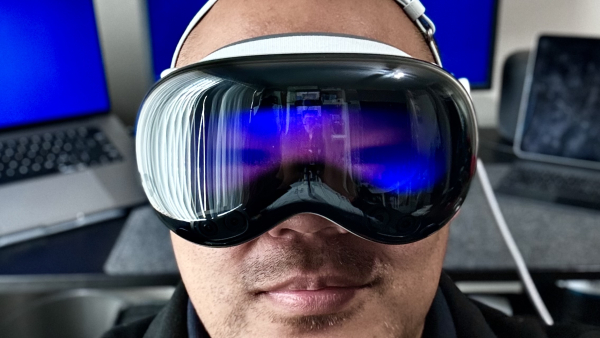
It's been just over two years of owning the Apple Vision Pro. After spending three months in Tokyo and one month in Manila with it as a digital nomad, I have a much better sense of how AVP fits into my life. Here are my thoughts:

  • The "Lie Flat" Device — Back in 2011, Steve Jobs argued that the PC is a "lean forward" device — meant for sitting at a desk, looking at a monitor, and actively working. In contrast, he pitched iPad 1.0 as a "lean back" device, primarily for consumption.1 If we stick to that analogy, AVP is a "lie flat" device. I've spent hours lying in bed and on the couch watching movies on a theater-sized screen floating above me, and I've grown quite fond of casually browsing Reddit and AirPlaying my iPhone while binging TV shows.
    • …Except when sick — When I'm dealing with congestion or a headache, the very last thing I want to do is strap a giant headset to my face.
  • Amazing in small spacesAVP's ability to dial up immersion makes small hotel rooms and economy seats feel like wide-open spaces. There were so many times I took off the headset and thought, "Whoa, I forgot I was in this tiny room."
    • Gray area for airlines — Airlines are cracking down on power banks due to fire risks, and AVP's external battery now sits in an awkward gray area. To a flight attendant, it can look suspiciously like a power bank. To a techie, it's the device's primary power source — no different conceptually from a laptop's internal battery. In practice, whether I get to use it mid-flight comes down to who's working the cabin that day.
  • The New Dual Knit Strap — A big improvement in comfort over the original Solo Knit and Dual Loop straps.
  • Typing Still Sucks — Unless I have a Bluetooth keyboard connected (which I never do), I've given up on any meaningful typing. Passwords and quick searches only. Hopefully Apple adds something like Apple TV's Remote Keyboard feature.2
    • My Workaround: Hyperduck — Instead of pecking at the virtual keyboard, I use Hyperduck to send links to my Mac, where I can actually be productive.
  • Multitasking is Not Great — Native Vision apps are intentionally designed with big buttons and extra padding to improve Gaze & Pinch accuracy. The downside: apps take up a lot of visual space, and having multiple windows side-by-side means turning my head way more than I'd like. I've settled on Mac Virtual Display or a max of two windows at a time. Hopefully Apple adds something like macOS' Mission Control down the road.3
  • Mac Virtual Display: Ultrawide on Demand — Here's what I've realized working remotely: I don't like wearing AVP for an entire workday — but that's okay, because about 85% of my work is fine on my 16" MacBook Pro screen. The remaining 15% — when I need serious screen real estate for designs, documentation, VS Code, Terminal, Claude, and Chrome all at once — Mac Virtual Display absolutely shines.
    • Can't stream DRM'd content via Mac Virtual Display — Due to DRM and HDCP standards, streaming video to your Mac while using Mac Virtual Display results in a blacked-out screen. Frustrating, because I love having a shitty horror movie running in the background while I work.
  • No True iPhone Mirroring — AirPlaying the iPhone screen to AVP is possible, but true iPhone Mirroring — with actual control of the phone, like on macOS — isn't. This feels like an obvious feature Apple will add eventually.
  • AirPlay, iPhone Mirroring, or Mac Virtual Display — I hate having to pick just one. Ideally I'd mirror both my Mac and iPhone to AVP simultaneously and stay fully immersed. But because all three share the same underlying wireless pipeline, only one can stream at a time. (And I refuse to pay $300 for the Developer Strap to work around it.)
  • Official YouTube App — HUGE. Once they add downloadable videos for YouTube Premium subscribers, AVP becomes the ultimate travel entertainment device.
  • NBA Courtside POV — GAME-CHANGER. My Lakers were the first team to broadcast games as immersive video, and it's unlike anything else. Courtside seats for a regular-season Lakers game start around $2,500 — I'd argue that watching just two marquee games in immersive video alone justifies the cost of AVP.
  • Spatial Photos & Videos — This one hits different. Before my dog passed away, I managed to capture a handful of spatial videos. Now, whenever I feel like my memories of him are starting to fade, I rewatch those videos and I'm instantly transported back to that exact moment. Nothing else does that. Nothing.

When I originally bought my AVP, a big part of my Boy Math4 was a 50/50 split between work and entertainment. Even with the much-improved Dual Knit strap, the weight still makes wearing it for an entire workday uncomfortable. My usage has settled at about 10% work — and honestly, I'm cool with that, for now.

I can get by without an external monitor for my MacBook Pro…but I still prefer one. I can get by without my iPad Pro streaming background video while I work…but I still prefer having it. My plan now is to hold onto my LG Ultrafine 5K and iPad Pro as long as possible, and bet that Apple Vision Pro 2 or 3 gets more comfortable by the time I'm ready to retire them.

As for the remaining 90%? As a bachelor with plenty of uninterrupted downtime, I fucking love my Apple Vision Pro. When I need an evening to rest and recharge, nothing beats lying flat in bed, fully immersed in an IMAX movie floating above me.

Two years in, Apple Vision Pro still feels like a device that's figuring itself out — and honestly, so am I. The hardware will get lighter. The software will get smarter. Features I've been waiting for (iPhone Mirroring, downloadable YouTube, better multitasking) feel less like wishful thinking and more like inevitabilities.

Check back with me in another year or two.


  1. iPad — As time went by, the iPad has evolved into a mobile production/creation device of sorts. 

  2. Remote Keyboard — On Apple TV, whenever you navigate to a search bar, login field, or any text entry box, a push notification automatically appears on your nearby iOS devices, allowing you to enter text using your iOS device's keyboard. 

  3. Mission Control — On macOS, Mission Control gives you a "bird's-eye view" of your entire workspace. It's a built-in macOS feature designed to help you manage the chaos of multiple open windows, full-screen apps, and virtual desktops. 

  4. Boy Math — A viral social media trend and meme format that highlights the illogical or self-serving rationalizations men sometimes use to justify their behavior, finances, or perception of time. 

WWDC 2025

Fanboys are gonna (rightfully) talk shit about how Apple is so far behind the competition when it comes to AI, but aside from that, Apple announced some solid updates this year. Here are some of the things that I'm personally looking forward to.

iOS

  • Liquid Design
    • Clear Mode — As someone who has spent an embarrassing amount of time customizing his home screen, I love the idea of optionally switching my icons to Clear.
  • Games app — I like the theory that Apple could separate games from the App Store for the purpose of offering a different revenue share for app developers.
  • Music app
    • Pinned Playlists — FINALLY. It's always been a pain in the ass to find the right playlist or radio station in the Music app while I'm driving.
  • Messages
    • Chat Backgrounds
    • Chat Polls
    • Message Screening — YES. So tired of all the spammy texts, especially during election season.
    • Group Chat Type Indicators
    • Photo Previews — Setting for the Messages app to only send a lower-quality preview of a photo while an iPhone is in Low Data Mode. The full photo will be sent later.
  • Clock
    • Snooze Customization — FINALLY.
  • Phone
    • Call Screening
    • Hold Assist
  • Wallet
    • Order Tracking
    • Flight Tracking
  • AirPods
    • Pause-on-Sleep — Nice addition for someone who often falls asleep to podcasts when flying.
  • Third-Party Apple Intelligence — BIG ONE. I am desperately hoping social media apps will offer AI-powered smart filters, so I can set up things like, "mute all political posts made by this person".
  • Battery Time-to-Charge — FINALLY. Love this for travel.

watchOS

  • Wrist Flick Gesture
  • Third-Party Control Center Buttons

tvOS

  • Profiles on Load — YES. No more dealing with my parents accidentally watching stuff under my Apple TV profile and ruining my watchlist.

macOS

  • Spotlight
    • Clipboard History — FINALLY.
    • Intelligent Actions — AWESOME for power users. I've never been a huge Alfred, Keyboard Maestro, or Raycast user, but this offers just enough functionality that I can see myself getting into this.
  • Continuity
    • Live Activity
    • Phone app
  • Folder Icon Customization

visionOS

  • Placement Persistence
    • Widgets — YES. Big improvement to make my surroundings feel more like my very own digital space.
  • Spatial Scenes — This is INCREDIBLE. Photos of my beloved dog look ridiculously realistic now.
  • Shared Experiences with other AVP users
  • Improved Personas
  • Jupiter environment
  • Unlock iPhone — YES. Now just need iPhone Mirroring.
  • Folders — Finally getting around to some of the basics.
  • Look-to-Scroll

iPadOS

  • Windows Multitasking — FINALLY. I personally won't be using this that much but this bodes extremely well for the iPad's future.
  • Open With… — Definitely feeling more like a desktop computer.
  • Preview app

WWDC 2024 →

A quick rundown of all my most-anticipated announcements (and unannounced tidbits) from WWDC 2024:

visionOS

  • Mac Virtual DisplayHuge updates for productivity!
    • Mouse Support — This makes working with Vision apps and Mac Virtual Display way more seamless.
    • Wide and Ultra Wide Screen Options — YES. I can easily see myself downgrading from the 16-inch screen to 14-inch for my next MacBook Pro.
  • New GestureWay easier and efficient to invoke Home View and Control Center! Also alleviates my annoyance with how inefficient it was to see the time.
  • Create Spatial PhotosFucking. Awesome. All of my food photos can be transformed with AI into Spatial Photos. I've already done a few and this is just mind-blowing. It's hard to describe, but the experience is somewhere between looking at a two-dimensional photo and actually being there in the moment.
  • Rearrangeable Home View
  • New Bora Bora Environment — Great addition! These immersive environments are going to be such delightful additions like getting new watch faces in watchOS.
  • AirPlay Receiver — Not sure exactly how I will use this but I appreciate any feature that let's me bring non-AVP things into my AVP.
  • Improved Hand Tracking — Upgraded from 30Hz to 90Hz to make my hands feel more realistic when immersed. (For context, Meta Quest is 60Hz.)
  • Improved Full Screen Videos in SafariHuge improvement for watching videos on YouTube, Hulu, and other streaming services that can only be played on AVP via Safari. This gets the YouTube experience from completely unbearable to totally doable. Nothing will beat a native app but this is good enough to significantly increase my AVP usage.

Apps

  • New Passwords AppGoodbye, 1Password! For me, this will be a game-changer for helping me manage my parents' passwords.
  • Messages Improvements — Some of these are catch-ups but some are also enhancements to subtly keep iMessage blue bubbles positioned above SMS/RCS green bubbles.
    • Scheduled MessagesFinally. I constantly find funny links that I want to send to certain friends but know it's inappropriate to text late at night.
    • Easier Tapbacks — Love to see iMessage adopt this from Slack/Discord.
    • Text Effects — This will be fun to play around with.
    • Messaging via SatelliteWow. Maybe I can start doing more outdoorsy, off-the-grid type things when I travel?? Very curious to see how this evolves.
  • Reminders in CalendarGoodbye, Fantastical! This alone will save me $57/year.
  • Math NotesGoodbye, Soulver! (Assuming this works as I hope it does.)
  • Highlights in Safari — A welcomed enhancement for browsing websites. I like how Apple is using AI to enhance the web instead of trying to replace it like Open AI and Google.
  • Redesigned Photos — The navigation is controversial but customizable so we'll see how this pans out.

iOS & iPadOS

  • Home Screen and Control Center CustomizationsFinally. Not sure how much I will personally use these new options but this should've been implemented years ago.
  • Customizable Lock Screen Buttons — I'm looking forward to replacing the bottom-left Flashlight button with Camera and the bottom-right Camera button with Overcast. This just makes so much sense for me when I'm taking food photos with my left hand or opening Overcast when I get in my car.
  • Lock/Hide AppsFinally. Also, this will be awesome for parents who let their kids play with their phones.
  • Remote Screen Control during Screen ShareHuge for being our parents' tech support.
  • Vocal Shortcuts — Custom voice trigger words!
  • Custom Charging Limits — A nice little improvement for maintaining battery health.
  • T9 Dialing for iOS — A nice little quality-of-life improvement that is a welcomed copy from Android.
  • Calculator App for iPadHoly. Shit. A basic calculator app should've been added over a decade ago but they just dropped this bomb like Taylor Swift.
  • Smart Script for iPad — As someone who has struggled with chicken-scratch handwriting all my life, this thing is absolutely mind-blowing.

AirPods

  • Head GesturesWow. Such a brilliant feature to answer/reject voice calls.

tvOS

  • Subtitles on Mute — A delightful enhancement for such a common use-case.
  • InSight for Apple Originals — This won't replace Callsheet for me because it won't have actor ages and heights, but this is a welcomed enhancement that I could see being added to to any video played in the TV app.

watchOS

  • Double Tap for Third-Party Apps
  • Live Activities
  • Distance and Route Maps for More Workouts
  • Vitals App
  • Custom Ringtones and Text TonesFinally.

macOS

  • iPhone MirroringWow. Apple's Continuity continues to be the gift that keeps on giving! I totally expect this to come to Apple Vision Pro but I'm also curious to see if this will eventually evolve into something like Samsung DeX.
  • iOS Notifications on MacFuck yeah. Back in 2011, I wrote about how redundant push notifications will be a problem. Apple went a different route than I proposed but I'm here for it!
  • Window SnappingFinally. Not sure if I will personally use this but this is a welcomed copy from Windows.
  • Keep Downloaded for iCloud Files — Big quality-of-life improvement for managing offline assets that are hosted on iCloud Drive.

Apple Intelligence

  • Onscreen Awareness and Personal Context — Because the system has an understanding of what you're looking at, what your tendencies are, and what actions your apps can do, Siri can take action inside and across apps. Fucking amazing and I'm dying to play around with it.
  • ChatGPT Integration — It's here! It's free! And it's private. (Love how it'll seamless upgrade to ChatGPT Pro too.)
  • Priority Notifications — Curious to see how this pans out, especially with the auto-summaries.
  • Reduce Interruptions Focus Mode
  • Clean Up in PhotosFinally we'll be able to remove people and things from our photos in the native Photos app.
  • Smarter Search in Photos — I just want to be able to say, "Siri, show me everything shot on this day."
  • "Siri, how do I…?"Huge for my parents.
  • Genmoji — This honestly might replace GIF reactions for me in my daily interactions. Can't wait!

Overall, this would have to be one of the best WWDCs I've seen. It had an excellent variety of quality-of-life improvements, nice catch-ups from Android, meeting AI expectations, and a few mind-blowing announcements. Can't wait to get my hands on the public betas!

Three Months with Apple Vision Pro

Back in 2017, I wrote:

While everyone is talking about next-gen smartphones like the very impressive Galaxy Note 8 and the highly-anticipated iPhone X, I'm more interested in what's being built on top of smartphones that will bridge us to the next big thing — Augmented Reality.

At the time, Apple was on the verge of launching ARKit for iOS developers, which was Apple's first public building block towards the next big (hardware) thing that comes after the smartphone[^1].

Fast forward seven years to today, we finally have Apple Vision Pro (AVP).

The hype cycle has completely come and gone these past few months, but I've been using my AVP every day since launch and I've collected all my thoughts on the hardware, software, and user experience into this post.

Let's get into it.

Read More

Introducing Apple Vision Pro

Lots of hot takes immediately dismissing the Apple Vision Pro. They're all short-sighted. Here are some historical fun facts about Apple products:

So what are people saying about Apple Vision Pro?

"It costs 7x as much as the Meta Quest…"

Yes, that's true. As Ben Evans puts it:

Meta is trying to catalyze an ecosystem while we wait for the right hardware - Apple is trying to catalyze an ecosystem while we wait for the right price.

Both paths are good bets…but I think Apple's vision is smarter.

Zuckerberg envisions everyone wearing VR headsets for most hours of the day, both at work and at home. His belief is that your digital life will be as important as your physical life. To Zuckerberg, living in the digital world is socializing, not isolating.

Apple disagrees. Tim Cook has said for years that the goal is to have AR enhance the real world around you. The Vision Pro is built from the ground up to let interact with both the real world and the digital world at the same time.

Nilay Patel of The Verge, summed it up the best:

Meta Quest 2 is a mid-range Android smartphone on your face.

Apple Vision Pro is a MacBook on your face.

In the pre-iPhone era, the smartphone was thought of as a cell phone with apps. Then Apple launched a mobile computer with a phone app.

If the "metaverse" is going to be a thing, Apple will make it just one dimension of spatial computing.

"The 2-hour battery isn't even long enough for a movie! LOL"

Yup, and that's fine for this v1.0 model! This generation is targeted for developers and will only be used for indoor, stationary situations. The fun begins when it becomes portable, but we need developers to make that meaningful.

"Creepy Black Mirror vibes."

I gotta admit, the spacial camera demo of the father recording his kid's birthday while wearing Apple Vision Pro is a bit cringey…and we all know how Google Glass was rejected. But remember: there was a time when having a camera on a cellphone was considered creepy too.

We'll see how this pans out, but for now, Apple Vision Pro will clearly indicate to others when you are recording.

"I'm not going to walk around with ski goggles on my face."

I'm not planning on it either, lol. But that's fine, because Apple is playing a very, very long-game here.

Overall, Apple Vision Pro is a massive step towards AR glasses. This is a long stop-gap to get developers building on the AR platform until the product is portable to wear outside and affordable enough for the common consumer.

And if there's any tech company in the world that will miniaturize powerful hardware into something the size of a pair of sunglasses, it's Apple.

When We Shifted from "Smartphones" to Actual Smartphones →

Nokia and Blackberry were skating to where the puck was going to be, and felt nice and fast and in control, while Apple and Google were melting the ice rink and switching the game to water-skiing.

At the time, Nokia and Blackberry seemed to be leading the way to the future. There weren't wrong…but iPhone and Android completely changed the game.

Side-Loading and Third-Party App Stores →

The biggest argument I've heard in support of side-loading and third-party app stores for iOS is:

I'm paying over $1,000 for my device. I should have the right to do whatever I want with it!

While I do agree with that sentiment, I firmly believe that would only lead to a shitty path for iOS. Marco Arment perfectly illustrates my my same sentiments:

I don’t expect side-loading or alternative app stores to become possible, and I’m relieved, because that is not a future I want for iOS.

When evaluating such ideas, I merely ask myself:

“What would Facebook do?”

Facebook owns four of the top ten apps in the world. If side-loading became possible, Facebook could remove Instagram, WhatsApp, the Facebook app, and Messenger from Apple’s App Store, requiring customers to install these extremely popular apps directly from Facebook via side-loading.

And everyone would.

And then:

Alternative app stores would be even worse. Rather than offering individual apps via side-loading, Facebook could offer just one:

The Facebook App Store.

Instagram, WhatsApp, the Facebook app, and Messenger could all be available exclusively there.

The majority of iOS users in the world would soon install it, and Facebook would start using leverage in other areas — apps’ social accounts, stats packages, app-install ads, ad-attribution requirements — to heavily incentivize (and likely strong-arm) a huge number of developers to offer their apps in the Facebook App Store, likely in addition to Apple’s.

Maybe I’d be required to add the Facebook SDK to my app in order to be in their store, which they would then use to surveil my users.

Maybe I’d need to buy app-install ads to show up in search there at all.

Maybe I’d need to pay Facebook to “promote” each app update to reach more than a tiny percentage of my existing customers.

This would be true for any conglomerate, including Amazon and Google. But I'm specifically concerned about Facebook.

We all know how much Zuckerberg hates Apple for implementing so many tracking-prevention measures that harms Facebook's business model. There's no doubt in my mind that Facebook would leverage its apps against Apple.

I support this.

At the very, very least, Apple needs to allow developers to offer alternative payment options:

  • all in-app purchases must offer a Pay with iTunes option
  • the Pay with iTunes button must be more prominent than any other payment option